Activity & Writing Statistics
Inkweld keeps a running log of meaningful actions inside each project, and aggregates your daily word counts so you can see how your writing has progressed over time.
Activity and writing statistics are recorded server-side and require a hosted Inkweld instance. They are not available with a Browser profile — the profile-page widget and activity grid and the project Activity tab are hidden when no server is configured.
The writing-statistics widget and the project Activity tab are only shown to signed-in users. The profile activity grid follows the owner's profile visibility: when set to public it is visible to anyone, including visitors who are not signed in.
Writing Statistics Widget
A summary card appears on your own profile page (visit /<your-username>, e.g. by clicking your avatar). It shows, for the last 30 days:
- Words — net positive words written across every project you contribute to
- Active days — the number of distinct days that recorded any writing
- Projects — how many projects you actively contributed to in the window
- Recent activity — the most recent events from any of your projects, each linking to the relevant project
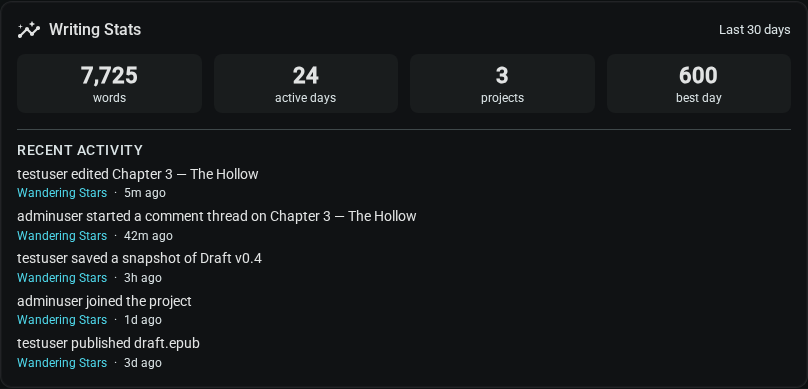
If the statistics endpoint is unreachable the widget hides itself rather than showing a broken state, so the rest of the profile page remains usable. The widget is only shown on your own profile — other visitors see the activity grid instead, if you have made it visible.
Profile Activity Grid
Your profile page also shows a year-at-a-glance grid of your writing, one square per day, shaded by how many words you wrote. It works like the contribution graph on code-hosting sites:
- Darker squares mean more words. Shading is relative to your own year, so a light square on a prolific year may still be a good day.
- Hover a square to see the exact word count and how many writing sessions it came from.
- Pick a year from the list beside the grid to look back at earlier years. The list runs from the first year you wrote in Inkweld to the current one.
- Active days, day streak (consecutive days ending today or yesterday) and longest streak are summarised above the grid.
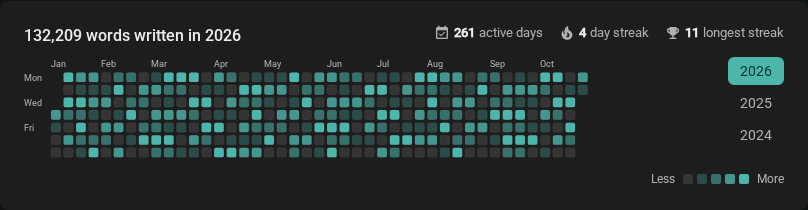
Days are counted in your browser's timezone, so a late-night session lands on the day you actually wrote it. Only words you personally wrote are counted, across every project you own or collaborate on — collaborators' words in your projects appear on their grid, not yours.
Who can see the grid is up to you: see Public profile.
Project Activity Tab
Inside each project the sidebar has an Activity entry. Selecting it opens an append-only feed of every meaningful change made to that project, newest first.
Project writing statistics
A Writing Stats summary sits at the top of the Activity tab and covers the last 30 days for this project only:
- Words — net positive words written in the project
- Active days — distinct days that recorded any writing
- Per active day — average words written on those active days
- Best day — the single highest-output day, with its date shown beneath the figure
Below the figures, a bar sparkline shows daily output across the whole window, with one bar per day (hover a bar for its date and word count). When more than one person has contributed, a Contributors breakdown lists the top five by word count with their share of the total. Until any words are recorded the card shows a short hint instead of zeros.
The summary reloads together with the feed when you press the refresh button, and hides itself if the statistics endpoint is unreachable so the feed remains usable.
The feed records:
| Event | Description |
|---|---|
| Document edit | Any net-positive edit to a document |
| Snapshot created | A versioned snapshot was saved |
| Comment thread | A new comment thread was opened |
| Comment reply | A reply was added to an existing thread |
| File published | A document was exported / published |
| Element created | A new worldbuilding element was added |
| Element renamed | An existing element was renamed |
| Element deleted | An element was removed |
| Items reorganized | "reorganized items": elements were moved, reordered or sorted |
| Tags updated | "updated tags on" an element |
| Worldbuilding updated | "updated worldbuilding on" an element |
| Relationship created | "created a relationship involving" an element |
| Relationship deleted | "deleted a relationship involving" an element |
| Collaborator invited | An invitation was sent |
| Collaborator joined | An invitation was accepted |
| Collaborator role changed | A collaborator's permissions changed |
| Collaborator removed | A collaborator was removed from the project |
The last five events (items reorganized, tags updated, worldbuilding updated, relationship created and relationship deleted) are currently recorded when changes are made through a connected AI tool over MCP. Edits you make by hand in the app do not add them to the feed.
Each entry shows the actor, the affected entity, and a human-readable timestamp (with the exact time in a tooltip). Older entries can be loaded on demand via the Load more button at the bottom of the feed.
Refreshing the feed
The activity feed is fetched once when you open the tab. Use the refresh button in the tab header to pull the latest events (and the latest writing statistics) without leaving the page.
Error handling
If the activity API is briefly unreachable an inline error message and a Retry button appear. Activity events are stored permanently — retrying once the connection recovers will load the full backlog.
Privacy
- Activity events are scoped to the project. Only people who can already access the project (the owner and approved collaborators) can see its activity feed.
- The cross-project profile widget only ever shows your own projects and projects you collaborate on.
- Events include your displayed username at the time of the action; renaming your account does not rewrite history.
- There is currently no way to delete individual activity events. Deleting a project removes its activity log entirely.